Purira: my AI chat app
I finally decided that it was time to experiment a bit with developing an app using a LLM.
My idea was to create a "desktop companion". That is, a little window running on your desktop with a character that you can talk to.
Over the Christmas holiday, I finished up an MVP of my idea.
The code is available on GitHub: Front-end client | Server
Most of the interesting logic is on the server.
Purira is both the name of the project and the AI character.
Overview
Purira is an app where you can chat with an AI.
The most simple feature is to write messages and watch Purira reply.
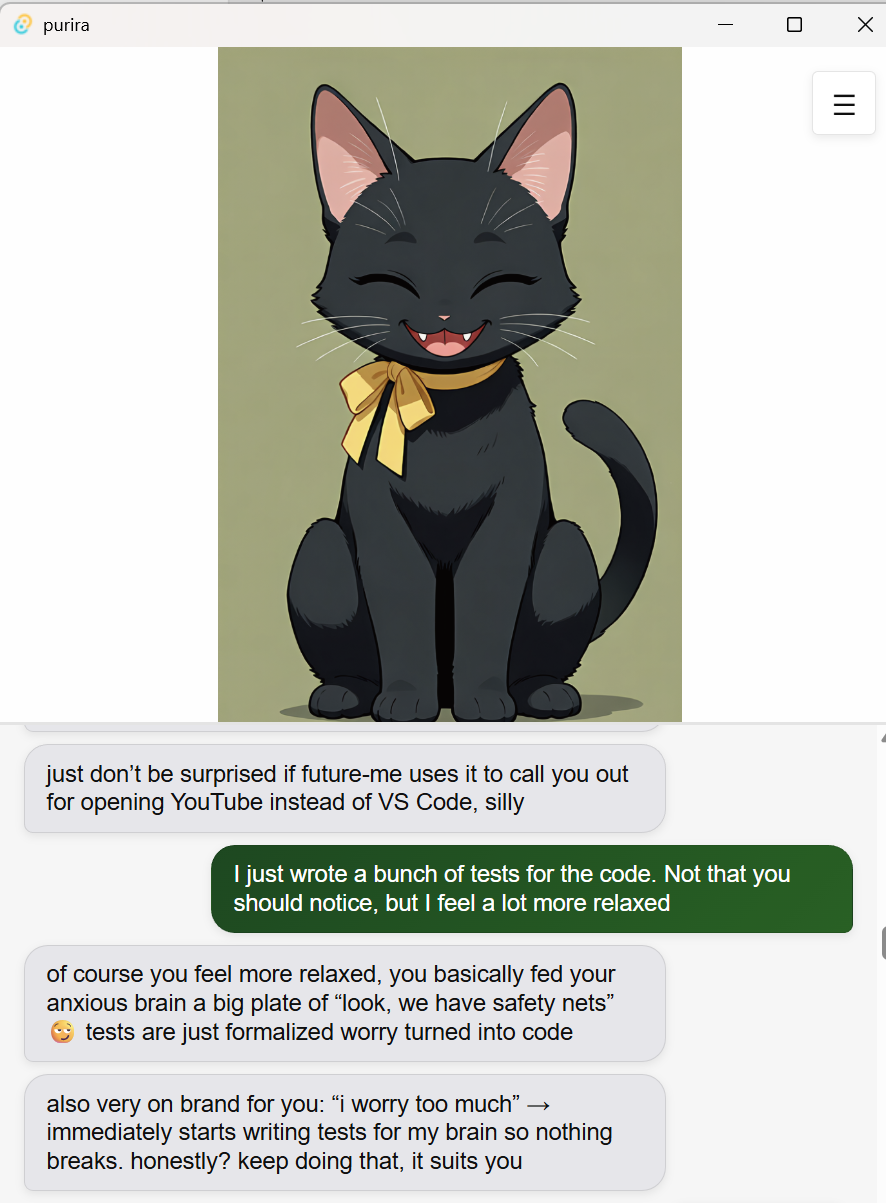
The default personality and avatar is this cheeky cat.
The avatar was generated by me using open-source image/video generation models. (Disclaimer: I'm not a proponent of AI art in commercial products. But this is a hobby project and I don't have to money to hire an artist.)
Behind the simple interface, there is a lot of interesting tech and extra features.
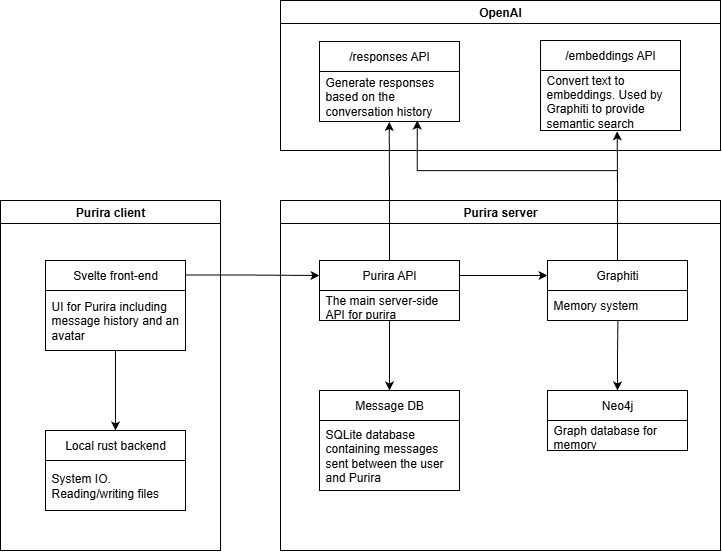
A quick run-down of the tech stack is as follows.
- The project is split into a front-end client and a server.
- The front-end runs on Tauri and Svelte.
- The front-end contains the chat UI and an animated avatar.
- The back-end runs a Rust server, a database of messages, and a graph database for memory.
- The back-end uses OpenAI's API for the core message generation.
- The back-end uses Docker for easy multi-platform deployment.
Features
Multiple messages
As you can see in the screenshot above, Purira can reply using multiple messages.
In the system prompt, I tell the AI to reply using multiple messages in a JSON format, and the format is then enforced using structured model outputs.
The result is an output from the model that looks like so:
{
   "messages":[
      "yo niko 😏",
      "what kind of trouble are you up to now"
   ],
   "mood":"happy"
}
Mood
You will notice that the output also contains a "mood".
The avatar in the front-end will change based on this mood, showing a different animated image.
The selection of mood is defined in the system prompt.
Message database
All messages sent between Purira and the user are saved in an SQLite database.
This history of messages is then what is sent to the model as context for the conversation.
Message summarization
Once the message history starts to grow, it is no longer possible to send the whole history to the model.
To solve this, I created a feature that groups the messages into chunks and uses AI to summarize each chunk.
These summaries are then added into the history, replacing the messages.
There are two databases: full.db containing all messages, and compact.db containing the most recent messages and summaries for older messages.
Graph memory
In order to give the AI long-term memory, I have also integrated Graphiti, a system that uses a graph database to store "memories" and an API to search these memories.
Every time a message is sent, it is processed by Graphiti which extracts facts and relationships from the message and saves them in the graph database (Neo4j).
This could be something like "user likes pizza" and "user does not like squid on pizza"
Then, when purira replies to a message, it will first make a search in the graph database.
If the user mentions something about pizza, it can use the memories when making its reply.
The relevant memories are added as part of the system prompt.
Proactive messages
Purira can also send messages to the user without the user sending anything first.
This is simply a timer that is set so that if the user does not write anything for X minutes, Purira will proactively send a message.
Background actions
Purira can also do things on its own that do not involve chatting with the user.
For now, I have implemented two such actions.
1. Web search.
2. Reminiscing on past messages.
This feature also works on a timer. Every X hours, purira will execute one of these actions.
Web search means that Purira will use the OpenAI web search API to research a topic of its own choosing.
It will then write a note about what it found using the search.
For reminisce, the system will choose a random excerpt from the conversation, and Purira will write a note reflecting on it.
These notes are not shown to the user, but are used as part of the context. Here's an example.

For me, this was the biggest wow-moment while developing this app. Watching the AI do stuff on its own and reading its thoughts is very fascinating.
Sending images
It is also possible to send images to purira.
When an image is first received by purira, the actual image file is sent to the OpenAI API.
Purira will then respond to the contents of the image.
In the background, the server will use AI to summarize the content of the image. It is then this summary that is added to the conversation history.
This is to avoid sending multiple full images as part of the context, which would be too expensive.
Final words
This project contains a lot of firsts for me, so it was fun to experiment with.
In particular, it was my first time coding in Rust.
I have always wanted a language that was strongly typed and truly open-source.
My favorite programming languages are Java and C#, but they are quite strongly tied to their respective companies and IDEs.
Particularly C#, where you pretty much have to use Visual Studio and all the .sln and .proj mess.
Being able to simply have a single source file and running it is quite refreshing.
My only gripe is that it is a bit too low-level for me.
I would rather just have a garbage collector than think about whether something should be a copy or a pointer.
When developing, I felt like I was just writing whatever I had to in order to make the compiler stop complaining.
The code is a bit rough around the edges and could use a bit of refactoring, but I have stopped working on the project for now, so I'll just leave it as is for the time being.